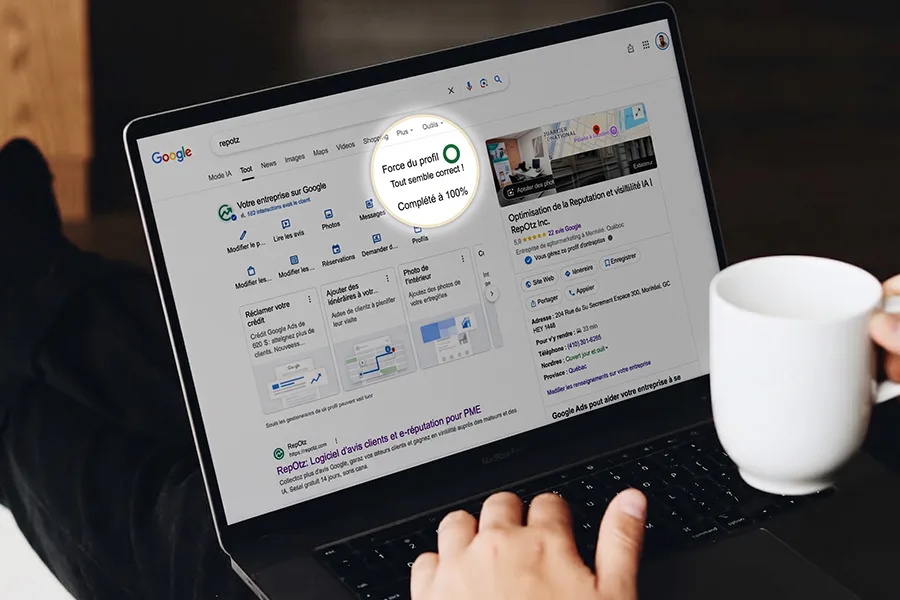
Two things worry business owners on Google more than they should. The first is a profile that keeps saying “incomplete” however much you fill in. The second is a reply to a review that you can see on your side, while your customer, and every tool that watches your reviews, still sees nothing.
Short answer: the “incomplete” label is a completion meter, not a verdict on your ranking, and a reply you can see is not always a reply the public can see. Google now checks replies before publishing them, and that check can take from a few minutes to several weeks. Below, what each one means, how to check where you stand, and what actually makes a Google Business Profile strong.
What the “incomplete” label on your Google Business Profile means
The circle at the top of your profile is Google’s Profile Strength indicator. It is orange while Google thinks something is missing and turns green when it considers the profile complete. According to Google’s help page on Profile Strength, it checks three things:
- missing information, such as your business description, hours and contact details;
- consistency of your profile across Google Search, Google Maps and Google Shopping;
- content: photos, videos and posts.
That is the part worth acting on. But the meter also counts features that have nothing to do with the quality of your listing. Local search practitioners reported early on that profiles stay orange until the business turns on Google’s messaging feature or starts a Google Ads account, and the “complete your info” flow itself leads to an Ads sign-up offer (BrightLocal, 2023).
Does an incomplete profile hurt your ranking?
Not by itself. Google’s help page presents Profile Strength as a tool to fill in your profile and makes no claim that the label affects ranking. Local search specialists are more direct: Profile Strength is not a ranking factor. What does count is the information behind it. Google explains that local results depend on relevance, distance and prominence, and complete, accurate information feeds relevance.
So fill in everything that describes your business truthfully. You do not need to buy ads or turn on a messaging channel you cannot staff just to see the circle turn green.
Why your reply to a review does not appear right away
Replies to reviews are now moderated. Google’s help page on reading and replying to reviews says replies are checked against its content policies before being posted, and that they “usually take up to 10 minutes to review, but sometimes a review can take up to 30 days.”
While a reply is being checked, you see it under the review in your own profile manager. Nobody else does: not the customer, not the public listing, not the tools that read that public listing. From the outside, the review still looks unanswered.
What tends to slow a reply down
Google does not publish its moderation criteria. Observers of the April 2026 change point to a few patterns that seem to hold replies back longer (ALM Corp, 2026):
- the same generic reply pasted under many reviews;
- promotional content in the reply, such as offers, links or phone numbers;
- personal information about the customer;
- aggressive or offensive wording;
- a profile whose ownership is not fully verified.
Most of the time none of this applies, and the reply is simply waiting in the queue.
How to check whether your reply is public
- Open a private browsing window, so you are not signed in to Google.
- Search for your business on Google Maps and open its reviews.
- Look for your reply under the review.
If it is there, it is public. If it is not, it is still being checked. Give it time rather than deleting and posting it again and again. If it has not appeared after a few days, check the wording against the list above and rewrite it if something matches.
Why a review tool may still remind you
Tools that follow your reviews, RepOtz included, can only read what Google shows the public. A reply still in moderation is invisible to them, so you may get a reminder for a review you have already answered. With RepOtz the reminder stops by itself once Google publishes the reply, and you never get more than two reminders for the same review.
What a strong Google Business Profile looks like
Forget the colour of the circle. A strong profile is one that answers a customer’s questions before they call, and gives Google enough to match you with the right searches.
Information that is accurate everywhere
- Name, address and phone number exactly as they appear on your website and in other directories.
- Hours, including special hours for holidays and closures. Wrong hours cost more trust than missing ones.
- A primary category that describes what you are, plus secondary categories for what you also do.
- A description in plain language: what you offer, who it is for, where you work.
- Services or products with the words your customers actually use.
- Attributes that matter to your customers, such as accessibility, parking or payment options.
- Your website, pointing to a page that says the same thing as the profile.
Proof that the business is alive
- Real, recent photos: the storefront so people recognise it, the inside, the team, the work.
- Posts now and then: news, an event, a seasonal offer.
- A steady flow of reviews. Google says more reviews and positive ratings can help your local ranking. Ask every customer, not only the ones you expect to be happy: filtering who gets asked breaks Google’s rules and misleads future customers.
Replies to every review
Google notes that replying shows customers you value their feedback. Reply to the good reviews and the hard ones, in your own words, and mention something specific from the review. It is also the best way to get through moderation quickly: a personal reply rarely looks like the generic pattern moderation is watching for.
A ten-minute weekly routine
- Read the new reviews and answer each one personally.
- Check in a private window that last week’s replies are now public.
- Look at your hours for the coming weeks and add special hours if needed.
- Add one recent photo or one post.
- Tap your own phone number and website link from the profile to make sure both still work.
If you want to see where your profile stands next to the rest of your online presence, reputation optimization explains how the pieces fit together.
FAQ
Should I sign up for Google Ads to complete my profile?
Only if advertising makes sense for your business. Ads can move the Profile Strength meter, but the meter is not what ranks you.
How long does it take for a reply to a review to appear?
Usually up to 10 minutes, according to Google, and sometimes up to 30 days while the reply is checked against Google’s content policies.
My reply shows in my profile manager but not on Google Maps. Is it lost?
No. It is most likely still being checked. Wait, then look again in a private window. Rewrite it only if it has not appeared after a few days, or if it includes promotional content or personal details.
Does answering reviews help my ranking?
Google does not list replies as a ranking factor. It does say that replies show customers you value their feedback, and future customers read those replies when they choose between you and a competitor.
Sources
- Google Business Profile Help, Manage your Profile Strength.
- Google Business Profile Help, Read and reply to reviews.
- Google Business Profile Help, Tips to improve your local ranking on Google.
- BrightLocal, New “Profile Strength” label rolls out to Google Business Profiles, 2023.
- ALM Corp, Google Business Profile review replies are now moderated, April 2026.
Ready to optimize your reputation?
Get a free audit of your online presence in seconds.